Portugal Visa (in Indonesia and Philippines) Photo
StandardCompiled from public references and the ICAO defaults. Not yet checked against an official source.
Quick facts
What a Portugal Visa (in Indonesia and Philippines) Photo must look like, from our document catalogue.
- Photo size
- 30×40 mm
- Digital size
- 354×472 px
- Head height (chin to crown)
- 70–80% of the photo height
- Background colour
- #FFFFFF
- Print resolution
- 300 DPI
Before and after
The same snapshot, straightened, cropped and put on the background this document asks for.


Get this photo now
We check every rule above before you pay.
How to take a Portugal Visa (in Indonesia and Philippines) Photo with your phone
Put your back to a plain, evenly lit wall and have someone hold the phone at your eye level, about 1.5 metres away, using the rear camera. Daylight from a window in front of you removes the shadows that get a Portugal Visa (in Indonesia and Philippines) Photo rejected. Keep your shoulders square, look straight into the lens, and let us crop to 30×40 mm with the head at 70–80% of the photo height.
Why a Portugal Visa (in Indonesia and Philippines) Photo comes back
Most rejected photos fail on three things: a background that is not #FFFFFF, a head that is too large or too small in the frame, and shadows or glare from a lamp behind the camera. Photos taken from too close also distort the face, and anything scanned or photographed off a screen loses the sharpness the clerk needs.
Where a Portugal Visa (in Indonesia and Philippines) Photo is used
A Portugal Visa (in Indonesia and Philippines) Photo is submitted with the application for this document in Portugália, whether you apply at a counter or upload the file online. Keep both the digital file and a printed sheet: many offices still ask for a physical print, and the digital copy saves you a second trip if the form is rejected for another reason.
Accepted and rejected examples
The same person six times. The three on the left follow the rules above; the three on the right are the mistakes we see most.
- Accepted

Even light, plain background
Daylight from the front, no shadow on the wall, background a single flat colour.
- Accepted
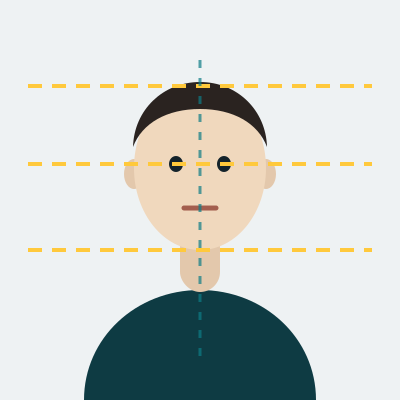
Head straight and centred
Eyes level, shoulders square to the camera, the whole face visible from chin to crown.
- Accepted

Neutral expression, eyes open
Mouth closed, both eyes open and unobscured, hair away from the eyes.
- Rejected

Shadow on the background
A lamp behind the camera throws a hard shadow, so the background is no longer one colour.
- Rejected
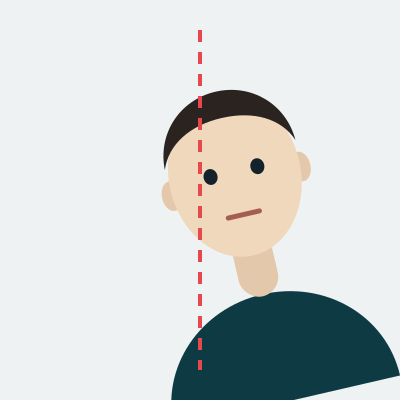
Head tilted or off centre
The face is turned away from the lens and sits off the centre line, so the measurements fail.
- Rejected

Glare, smile or covered eyes
Reflections on the lenses, a smile with visible teeth, or a fringe across the eyes.
The most common reasons this photo comes back
Each of these is checked automatically before you pay, so you find out in seconds rather than weeks.
The background is not #FFFFFF
A patterned wall, a second colour, or a shadow behind the head all break the plain background this document requires. We replace the background with the exact colour above.
The head is the wrong size in the frame
The head must measure 70–80% of the photo height from chin to crown. Standing too close makes it too large, and a cropped snapshot usually makes it too small.
Blurred or low resolution
A photo of a printed photo, a screenshot, or an image scaled up from a small crop loses the detail the clerk looks for. Shoot with the rear camera, not a screenshot.
Uneven light on the face
One lamp on one side leaves half the face dark. Face a window, or use two light sources at the same distance.
Questions about the Portugal Visa (in Indonesia and Philippines) Photo
What size is a Portugal Visa (in Indonesia and Philippines) Photo?
What background colour does a Portugal Visa (in Indonesia and Philippines) Photo need?
How big must the head be in a Portugal Visa (in Indonesia and Philippines) Photo?
Can I take a Portugal Visa (in Indonesia and Philippines) Photo with my phone?
How much does a Portugal Visa (in Indonesia and Philippines) Photo cost here?
How long does a Portugal Visa (in Indonesia and Philippines) Photo take?
Other documents at 30×40 mm
- Botswana Passport PhotoStandardBotswana · 30×40 mm
- Ethiopia Passport PhotoStandardEtiópia · 30×40 mm
- Turkmenistan Passport PhotoStandardTürkmenisztán · 30×40 mm
- Afghanistan ID card (e-tazkira) PhotoStandardAfganisztán · 30×40 mm
- Armenia ID card PhotoStandardÖrményország · 30×40 mm
- Azerbaijan ID card PhotoStandardAzerbajdzsán · 30×40 mm
Guides
- How to take a passport photo with an iPhoneWhere to stand, which camera to use, and why portrait-mode blur costs you the photo.
- Taking the photo at home without helpA door, a window and a timer are enough. Here is the setup that works in an ordinary room.
- Six mistakes that get a photo rejectedA shadow behind the head, a slight smile, glare on glasses — what reviewers actually look at, and the check that catches each one.
Was this page helpful?