A passport photo desk for your studio
Shoot in the studio, or send your customer an intake link. The same twelve checks run on every photo, your whole team draws on one monthly quota, and the files come out sized for the form.
Why studios use it
Minutes, not a re-shoot
The checks run while the customer is still in front of you, so a rejection is caught at the counter instead of at the passport office.
One quota for the whole team
Seats share a single monthly quota, so you are not buying a licence per photographer and nobody has to count photos.
Your customers can shoot at home
Send an intake link and they photograph themselves with the on-screen guide. The result lands in your queue for you to approve.
Every document, already measured
Head height, eye line, background and file size come from each document's own published rules, kept up to date for you.
How the intake link works
One link, no app and no account for the person on the other end.
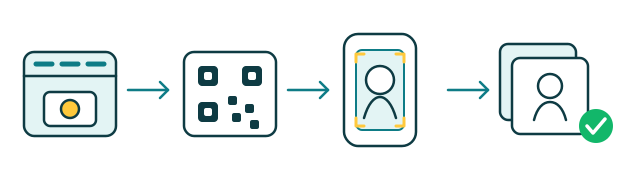
You send the link by message or print it as a QR code on the receipt.
Your customer opens it in a phone browser and shoots with the guide on screen.
The twelve checks run on the spot and ask for a retake if something is off.
The finished photo lands in your queue, ready to print or to email.
Studio plans
Both plans include every document, the automatic checks and the intake link. Yearly billing costs two months less.
How a studio starts in 5 minutes
Sign up
Create your account and name your studio — no calls, no waiting on us.
Pick a plan, or try it free
Choose a subscription, or start with the trial's photos while you get set up.
Add your team
Invite each photographer by email — they sign in with a link, no password to hand out.
Print your intake link
Share it by message or as a QR code on the receipt, so customers can shoot from home.
Questions from studios
What happens when we reach the monthly quota?
Can the whole team use one account?
Do my customers need an app or an account?
Can we put this inside our own system?
Ready to open your studio?
Sign up, pick a plan or start the trial, and send your first intake link today — no waiting on us.